
Raw documents vs. Derived documents
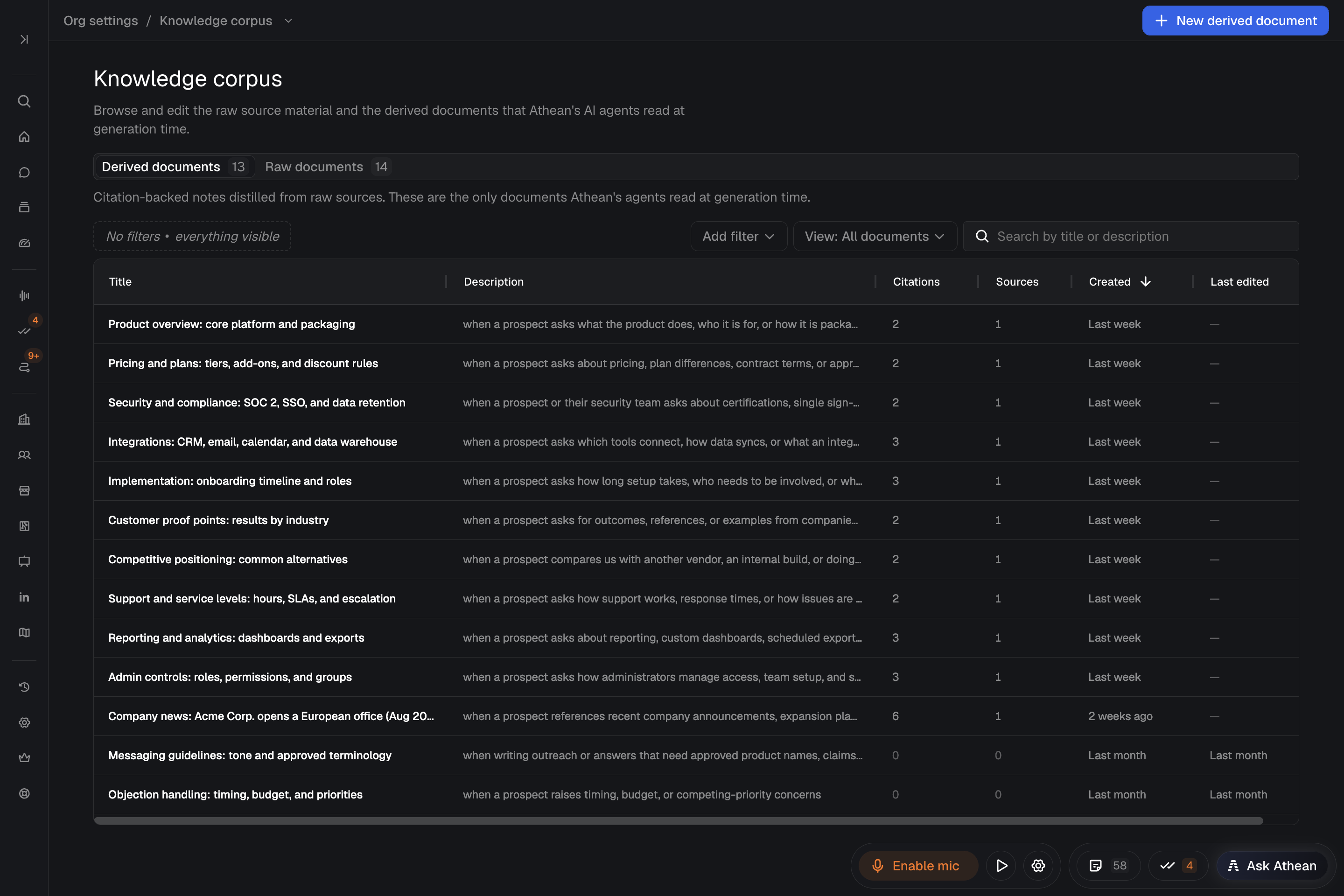
Org settings → Knowledge corpus stores the product documentation, positioning, case studies, and sales playbooks that ground Chat (including Ask Athean on the Meetings page) and AI operators. When the corpus has derived documents, Athean also generates cited insights during recorded meetings, which appear in the meeting's transcript afterward. Organization administrators manage the corpus across two tabs:
| Tab | Role in the corpus |
|---|---|
| Raw documents | Source material, such as uploaded PDFs, ingested files, and pasted or web-page text. Raw documents hold the verbatim evidence that derived documents cite, and a shareable link when the source has one. |
| Derived documents | Markdown guidance notes, each with a title, a description of when it applies, and verbatim citations pointing back to Raw documents. AI workflows read derived documents to answer questions and write outreach. |
Adding a raw document and writing the derived guidance that cites it are separate steps.
Add source material in Admin chat
- Open Org settings → Admin chat.
- Attach a source file (PDF, DOCX, PPTX, TXT, Markdown, CSV, or HTML), paste text, or enter a public page URL.
- Ask Athean to add the material to the knowledge corpus. Attaching a file alone doesn't add it; Athean only reads it in that conversation. Once you ask, Athean adds the material right away, with no confirmation step. A URL pasted with no other instructions is added as well.
- Ask Athean to compare the material with existing coverage and propose new or updated derived documents with verbatim citations:
Add this product guide to our knowledge corpus. Check for existing coverage, propose concise guidance for common buyer questions, and cite the source for each factual claim. Show me the changes before applying them.
- Review the proposal. Athean creates, changes, or deletes derived documents only after you confirm in the chat; corpus changes have no approval card.
- Check the results in Knowledge corpus. If your organization uses an active snapshot, the changes reach AI workflows only after you publish a new one (see Manage and activate corpus snapshots).
For a private content library or an ongoing connection to your internal documentation, contact support about the setup.
Create and edit raw and derived documents manually
- Create a derived document: In Derived documents, select New derived document. Enter a title, a description of when the note applies, and Markdown content. Select Add citation, choose its Source raw document (the first raw document is preselected), and paste the verbatim quote. Reference the citation in the content by its marker, such as
[^c1], then select Create derived document. - Edit a derived document: Open the note, select Edit, update the content or citations, and select Save changes. Follow its citation markers to check the source passage behind each claim. The Annotations panel is read-only; ask Athean in Admin chat to add or change an annotation.
- Upload a PDF raw document: In Raw documents, select New raw document. Upload PDF is selected by default. Select Choose PDF, enter a Title (optional) or leave it blank to use the file name, and select Upload and create.
- Add a text, URL, or file-reference raw document: In New raw document, choose Paste text, From URL, or File reference, enter the title and Extracted text (and, for From URL, the Source URL), and select Create raw document. All three need the text pasted in; From URL and File reference only record where the text came from. To have a page fetched or another file type read, ask Athean in Admin chat.
A raw document's text can't be edited; Edit changes only its title. When source facts change, add the updated source as a new raw document, then update the derived documents that cite the old one. Adding a source doesn't rewrite any notes. A raw document's Cited by list shows which derived documents cite it.
Athean lets you delete a raw document that is still cited, but no new snapshot can be captured while a note cites a deleted raw document, and deleting a published PDF takes its hosted page down. Deleting a raw or derived document can't be undone, so update the citing notes first. The one exception is a page or file reference whose address hasn't changed: Athean won't add a raw document whose Source URL or Source URI matches an existing one, so delete the old raw document, add the new one, and then update the notes that cited the old one.
Manage and activate corpus snapshots
A snapshot is a saved version of your knowledge corpus:
- If your organization has an active snapshot, AI workflows read that snapshot. Edits saved in Knowledge corpus reach them only after you publish and activate a new snapshot.
- If no snapshot is active, AI workflows read the latest saved documents directly.
Manage snapshots in Org settings → Admin chat; the document forms only save edits.
- Ask Athean whether your organization uses an active snapshot.
- Ask it to compare your saved, unpublished changes with the active snapshot.
- Review the changed guidance, the citations, and any warning that a quote no longer matches its source.
- Ask it to capture the reviewed corpus as a named snapshot, then confirm in the chat when you're ready to activate it. Activating a snapshot changes what AI workflows read across your organization.
Athean won't activate a snapshot while any citation no longer quotes its source exactly. Fix those citations first, or tell Athean that you accept publishing with the warnings. To roll back, ask it to activate an earlier snapshot.
Test corpus answers and citations
Ask a real buyer or product question in Workspace → Chat, or in Ask Athean on the Meetings page. Open the cited sources and check that each one supports the claim and that the answer reflects how your team wants to respond.
Athean selects the derived documents relevant to each question; it doesn't use every source in every answer. If an answer lacks coverage, add or improve the material, then check which snapshot is active.
Audit operator source citations in Content usage
Open Prospecting → Sequences → Content usage to see which knowledge corpus sources your organization's AI operators use when they write outreach. The page is open to everyone in your organization, not only administrators, and covers every operator. Each row is one generation: the personalized sequence an operator wrote for one contact.
- Pulled into context: Sources behind the guidance the operator read while writing.
- Cited in plan: Sources the operator planned to link. This column is hidden by default.
- Written in outreach: Sources linked in the email or LinkedIn messages it wrote.
A source with no shareable link can be pulled into context but never cited or written into outreach; an operator's Content usage section marks it no link. To give a PDF source a link, publish it as a hosted page for Anyone with the link.
Use Add filter to narrow the table by Operator, Source, or Stage reached. Generated sets the date range and is always applied. Select Open draft on a row to review what the operator wrote.
An operator's page in Sequences also has a Content usage section that totals each source for a period. Select a count to open the matching generations, or select View generations to see them all. You can also ask Chat which sources operators used most.