
Access sequence performance views
Sequence results appear in two places:
- One sequence, all time: Open a sequence in Prospecting → Sequences → My library. Its Performance section shows lifetime totals: Total contacts, Replied, Meetings, Open rate, Users, and Top persona. Select View full performance to open the dashboard filtered to that sequence.
- Several sequences, by period: Open Workspace → Activity → Dashboards, then select the Activity tab and Sequences. Choose the period, people, and sequences, and open the enrollments, emails, and calls behind those numbers.
An operator's page also has a Content usage section. It shows which knowledge sources the operator pulled into context, cited in its plan, and wrote into outreach, over a period you choose (see Knowledge corpus).
Filter by start date, people, sequences, and current step
- Set the period (for example, This week) and People in the dashboard header. On a small screen, open Filters to reach these controls.
- Under Filter by, search by sequence name or user and select one or more sequences. Results for several sequences are combined.
- To see where enrollments are waiting now, add a Step type or Step number filter. These match each enrollment's current unfinished step, including paused enrollments. Finished enrollments have no current step and don't match.
The period selects when sequences started. Results include all activity from those sequences through today, so a sequence that started last month can add replies this month.
While a step filter is applied, the email and call record pages are unavailable, including the one behind the Email replies headline. Clear the step filters to open them.
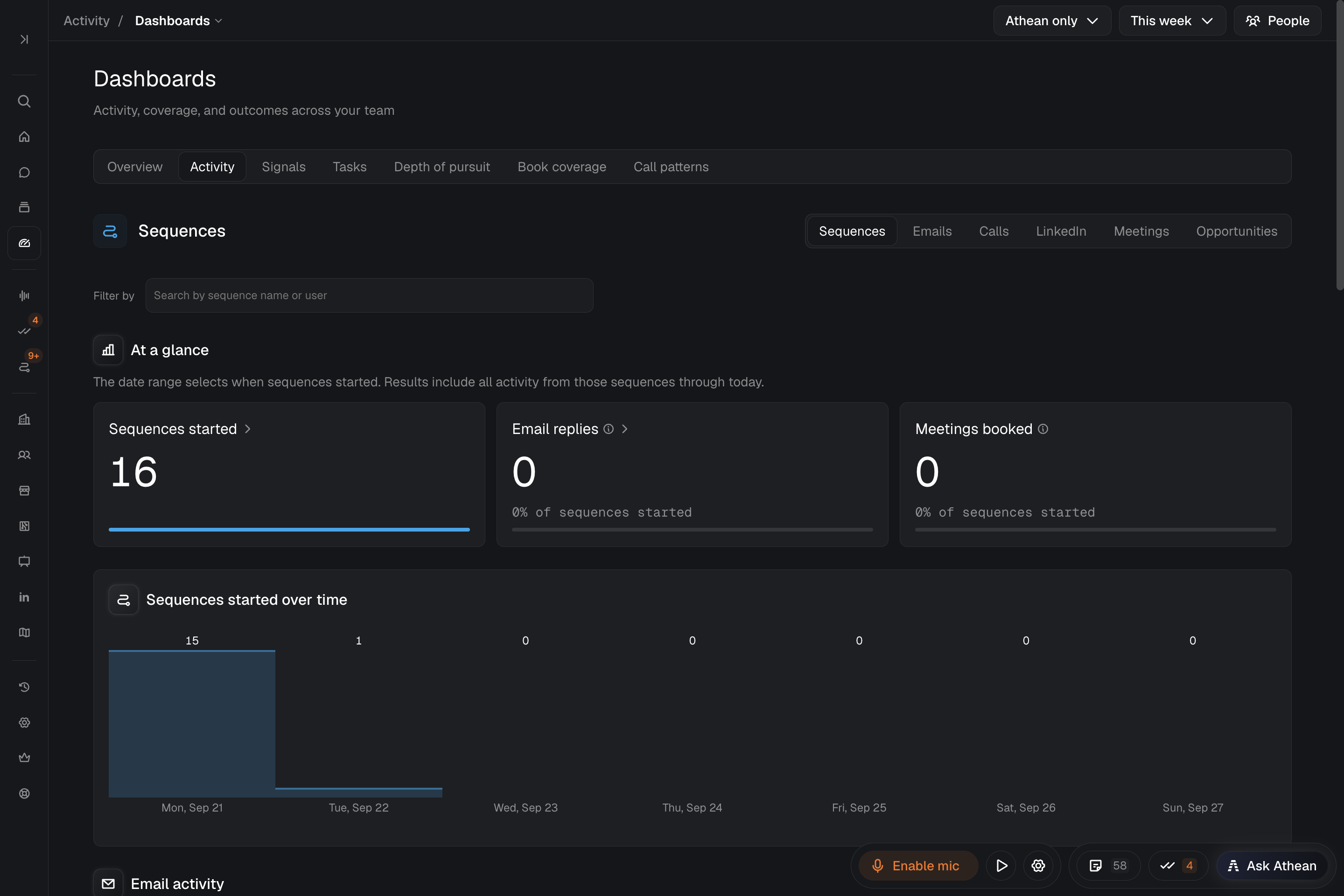
Sequence performance metrics and denominators
| Metric | Definition |
|---|---|
| Sequences started | Contact enrollments started in the selected period. Operator drafts waiting in Approvals aren't counted; a draft becomes an enrollment when it's approved. |
| Email replies (At a glance) | Emails from these sequences that received a real reply through today, each counted once. The percentage compares replied emails with Sequences started, so it can exceed 100% when sequences receive several replies. |
| Email activity: Sent, Tracked, Opened, Replied | Tracked is the sent emails where Athean can measure opens. Open rate is Opened ÷ Tracked. Reply rate is Replied ÷ Sent. Automated opens, automated replies, and bounces aren't counted. |
| Call activity: Calls made, Connected, Conversations | Calls made counts recorded calls; calls made outside Athean without recorded activity aren't included. Connected counts calls marked with one of your organization's connected dispositions. Conversations counts calls with a connected result that lasted at least 60 seconds. A call can count in both. |
| LinkedIn activity: Sent, InMails, Connection requests, Replies | Sent counts sent InMails, connection requests, and automatic LinkedIn messages, so InMails and connection requests may not add up to it. Manual LinkedIn messages, profile views, and post reactions aren't counted. Reply rate uses reply-eligible outreach sent through Athean as its denominator. Replies before June 17, 2026 aren't counted. |
| Meetings booked | Meetings booked through today from sequences started in the selected period. |
| Tasks: Tasks completed, Call tasks done, Tasks open | Call tasks done includes call tasks for calls made outside Athean, so it can differ from Calls made. Tasks open counts tasks open now for sequences started in the period; the period selects sequences, not task due dates. |
Hover a metric's information icon for its definition. A dash or Data unavailable means the metric isn't available, not a measured zero.
Drill into sequence enrollments, emails, and calls
- Enrollments: Select Sequences started or a Sequence mix tile (Operator, Template, Active, Paused, or Completed) to open the matching enrollments. From that table you can pause, resume, skip, reassign, or delete enrollments, or change the due dates of their open current tasks (see Approve and manage sequences).
- Reps: Per-rep breakdown compares starts, activity, and outcomes by rep. Select a rep to see their Selected sequences table.
- Emails and calls: Clear any step filters, then select a metric under Email activity or Call activity, or the Email replies headline. The Sequence emails or Sequence calls page opens with the same people, sequences, period, and metric. There, Sequence create date is the period filter and selects when enrollments started.
- Search: Search email subjects searches all matching emails. On calls, Search this page searches only the loaded page; if it finds nothing, use the filters or check other pages.
- Saving and returning: Save a useful setup as a saved view (see Saved views). Use the Dashboards breadcrumb to go back. If records fail to load, select Retry.
Read starts, activity, and outcomes together
- Many starts, little activity: Check Paused under Sequence mix and Tasks open under Tasks. A sequence waits at a manual step until its task is completed or skipped, so open tasks hold back the steps after them.
- Activity but few replies: Compare Opened with Tracked, and Replied with Sent, under Email activity. Open Sequence emails to read what was sent.
- Comparing sequences: Use the same period and people for each. Results include activity through today, so sequences that started recently have had less time to collect replies and meetings.